SSH, Subversion through SOCKS proxy on Mac OS X

UPDATE Apr 2, 2012
Due to the complete lack of updates for tsocks, I recommend the use of proxychains over tsocks. It accomplishes the same thing but works out of the box.

One persistent problem that I run into is that I need to access certain network resources through a SOCKS proxy server. This is all well and good if they are web resources — Safari, Firefox, etc. support SOCKS proxies quite well. However, I also need, for example, SSH and Subversion access to some resources. SOCKS support is woefully inadequate or nonexistent in these tools.

In the case of SSH, even if you google for this, you’ll run through thousands of examples of using ssh as a SOCKS server, but not through one as a SOCKS client. There are some convoluted solutions, but none of them I can use directly on an OS X 10.5 machine.

TSocks: the solution…if it were that easy

Now, tsocks is a nifty little tool to transparently divert network calls through a SOCKS 4 or SOCKS 5 proxy. This allows even non-SOCKS-aware applications to function through a SOCKS server.

Unfortunately it is very old, unmaintained code (1.8 beta 5 was released in 2002). It doesn’t compile cleanly on OS X due to this, nor will it compile under GCC 4.x. Further, it won’t work out of the box either if you do manage to compile it. The problem is that it relies on the Linux-only LD_PRELOAD functionality to use a shared library to hijack network system calls. This mechanism is called DYLD_INSERT_LIBRARIES on OS X and only works if DYLD_FORCE_FLAT_NAMESPACES is active.

Getting a working tsocks: MacPorts

There is an easy way to get tsocks. MacPorts ships a ported tsocks package. If you use MacPorts, sudo port install tsocks should do it.

Unfortunately on several machines I don’t use MacPorts, and don’t want to pull down an entire third-party package manager with its own library tree on each of these boxes. So I have do to this the hard way.

Getting a working tsocks: rolling my own

First to notice is that there are two tsocks distributions. One is the original tsocks 1.8b5, last updated in the first half of this decade. To make it work, follow the instructions provided by Marc Abramowitz in 2006. Note that his patch is actually located at his new domain address instead of the old, linked one.

The MacPorts distribution, on the other hand, is based on R. Garcia’s patched tsocks distribution, incorporating some modernization and new features by the Tor team. This distribution is numbered 1.8.x, with the last being 1.8.4. Unfortunately it is also no longer maintained, as the Tor devs forked this into a custom version to use with the Tor network only. Unfortunate, but for now, it still compiles, and works a bit better than the 2002 original.

To roll your own tsocks via source out of the MacPorts distribution, you will want the patches from the MacPorts repository. An outline of the compilation procedure:

  1. Download tsocks 1.8.4 from the author’s page
  2. Download all the patches from the MacPorts repository
  3. Concatenate all of the patches together:
    cat patch-* > tsocks.osx.patch
  4. Put the concatenated tsocks.osx.patch file into the tsocks source directory. Apply the patches:
    patch -p0 < tsocks.osx.patch
  5. Regenerate the configure script:
    autoreconf
  6. Configure the package:
    ./configure --prefix=/usr/local --bindir=/usr/local/bin --mandir=/usr/local/man --sysconfdir=/etc --libdir=/usr/local/lib
  7. Install the library and binaries:
    sudo make install
  8. Install the conf file:
    sudo cp ./tsocks.conf.complex.example /etc/tsocks.conf
  9. Edit the conf file. Make sure that if you’re not using tor, that you write in the conf file
    tordns_enable = false

Configuring tsocks

The complex configuration file example should have explained all of the features to be set. For my configuration:

Some important settings:

  • local – this setting, in the format of IP/netmask can be repeated several times, each time to exclude a set of IPs from being diverted to the SOCKS server. For obvious reasons, your SOCKS server will have to exist in one of these excluded IP ranges – otherwise you will never even reach your proxy server.
  • server and server_port – these should point to the IP address and port of your SOCKS server
  • server_typetsocks defaults to SOCKS4 mode. You may wish to set it to 5 for SOCKS5 usage.
  • tordns_enable – this needs to be set as false if you don’t use Tor.

Using tsocks

Once this is set up, simply prefixing the network command you want to run with tsocks will force a diversion through the proxy connection. For example:

tsocks ssh example.com

The same can be applied to Subversion.

tsocks svn update

will force the svn client to act through the proxy set in tsocks.conf.

SOCKS on localhost

Note that SOCKS services on 127.0.0.1 has a minor gotcha. Sometimes, you are able to SSH into a remote machine, and use that connection as your SOCKS server. This is described in my post about using SSH as a pseudo-VPN, which describes the -D switch. My use case here is that once you do this, all further local SSH connections to other machines should be diverted through the first SSH. For example, I’d like to do:

my-machine$ ssh -D 40000 gateway.example.com # establish a SOCKS server on localhost:40000 to the gateway host

and then:

my-machine$ ssh lan-1.example.com # access the protected lan-1 machine through the SOCKS, which will see me as gateway.example.com 

This is very doable in the tsocks setup if you set tsocks.conf:

server = 127.0.0.1/255.255.255.255
server_port = 40000

and then:

my-machine$ ssh -D 40000 gateway.example.com
my-machine$ tsocks ssh lan-1.example.com

This is the gotcha: make sure the netmask is set correctly to 255.255.255.255. Otherwise tsocks will die with a cryptic:

IP (127.0.0.1) & SUBNET (0.0.0.0) != IP on line 22 in configuration file, ignored

It is apparently fairly sensitive about the subnet mask setup to conform to exact standards.

With this tsocks setup, you won’t have to create special VPNs to lock a LAN machine behind a gateway. As long as you can SSH into the gateway machine from your local machine, you can access the resources behind it with any application on your local machine via tsocks. Nifty, huh?

Fixing undefined library symbols for compiling PHP 5.2.8

So while compiling PHP 5.2.8 on OS X 10.5, you might run into something like:

Undefined symbols for architecture i386:
  "_xmlTextReaderSchemaValidate", referenced from:
      _zim_xmlreader_setSchema in php_xmlreader.o
  "_xmlTextReaderSetup", referenced from:
      _zim_xmlreader_XML in php_xmlreader.o
ld: symbol(s) not found for architecture i386
collect2: ld returned 1 exit status
Undefined symbols for architecture x86_64:
  "_xmlTextReaderSchemaValidate", referenced from:
      _zim_xmlreader_setSchema in php_xmlreader.o
  "_xmlTextReaderSetup", referenced from:
      _zim_xmlreader_XML in php_xmlreader.o
ld: symbol(s) not found for architecture x86_64

This doesn’t only happen with libxml. If you’ve installed any extra updated libraries, like iconv or tidy or any library that has significant symbol changes between versions, it’ll die in similar ways. The MacPorts folks have encounted similar issues in ticket 15891, but WONTFIX‘ed the issue. Apparently the PHP devs are also punting on the problem.

The immediate cause is that you have multiple versions of some shared libraries. For example, in the case above, I have two libxml versions — one in /usr/lib, and another in /usr/local/lib. This is because I do not want to overwrite the Apple-provided libxml version, but still needed new features provided in later libxml versions. The arrangement works fine in every other software compile except this one, so I investigated further.

The root of the problem

Despite the developers’ airy dismissal of the issue, the underlying problem is indeed that the Makefile generated by PHP at configure time is slightly broken. In Makefile and Makefile.global, you’re going to see this line:

libs/libphp$(PHP_MAJOR_VERSION).bundle: $(PHP_GLOBAL_OBJS) $(PHP_SAPI_OBJS)
        $(CC) $(MH_BUNDLE_FLAGS) $(CFLAGS_CLEAN) $(EXTRA_CFLAGS) $(LDFLAGS) $(EXTRA_LDFLAGS) $(PHP_GLOBAL_OBJS:.lo=.o) $(PHP_SAPI_OBJS:.lo=.o) $(PHP_FRAMEWORKS) $(EXTRA_LIBS) $(ZEND_EXTRA_LIBS) -o $@ && cp $@ libs/libphp$(PHP_MAJOR_VERSION).so

where $MH_BUNDLE_FLAGS is usually defined as something like

MH_BUNDLE_FLAGS = -bundle -bundle_loader /usr/sbin/httpd -L/usr/lib \
 -L/usr/lib -laprutil-1 -lsqlite3 -lexpat -liconv -L/usr/lib -lapr-1 -lpthread

The problem is that this hardcodes the search paths for linking shared libraries. GCC searches for shared libraries to link in the order of the provided -L paths. In this case, MH_BUNDLE_FLAGS is expanded immediately after $CC — so the load order is:

  1. /usr/lib
  2. /usr/lib (these are redundant, and so will probably be collapsed into one path)
  3. …every other custom library path you specify

Now you see the issue. No matter what your library paths are set to, the PHP compilation system will insist that whatever shared libraries in /usr/lib take precedence. Therefore, even if you specified that another version (say, libxml.dylib in /usr/local/lib) should be used instead, the invocation to link against -lxml2 will search in /usr/lib first. And since it finds the old version, which may be missing a number of symbols, the compilation blows up right there.

Evidence

And indeed, if you look at the (rather long and massive) compilation/link command right before it fails, you’ll see:

gcc -bundle -bundle_loader /usr/sbin/httpd -L/usr/lib -L/usr/lib \
-laprutil-1 -lsqlite3 -lexpat  -liconv -L/usr/lib -lapr-1 -lpthread -O2 -I/usr/include -DZTS   \
-arch i386 -arch x86_64 -L/usr/local/lib ... 

emphasis mine, where /usr/local/lib might be /opt/lib or whatever custom path you provided to configure.

Solutions

The trivial solution is to manually invoke that last line of compilation, but swapping the -L load paths.

gcc -bundle -bundle_loader /usr/sbin/httpd -L/usr/local/lib -L/usr/lib \
-L/usr/lib -laprutil-1 -lsqlite3 -lexpat  -liconv -L/usr/lib -lapr-1 -lpthread -O2 -I/usr/include -DZTS   \
-arch i386 -arch x86_64  ... 

This is easy to do and takes just a second.

Another possible solution is to patch the Makefile, such that MH_BUNDLE_FLAGS comes later in the compilation line:

libs/libphp$(PHP_MAJOR_VERSION).bundle: $(PHP_GLOBAL_OBJS) $(PHP_SAPI_OBJS)
        $(CC) $(CFLAGS_CLEAN) $(EXTRA_CFLAGS) $(LDFLAGS) $(EXTRA_LDFLAGS) $(PHP_GLOBAL_OBJS:.lo=.o) $(PHP_SAPI_OBJS:.lo=.o) $(PHP_FRAMEWORKS) $(EXTRA_LIBS) $(ZEND_EXTRA_LIBS) $(MH_BUNDLE_FLAGS) -o $@ && cp $@ libs/libphp$(PHP_MAJOR_VERSION).so

This will force your library paths to be searched before /usr/lib, thus resolving the link problem.

update 7/18/09
An anonymous reader mentions that you could also specify the right libxml by full path, instead of letting it use -lxml. Basically, in the last compilation line, you would remove any mentions of -lxml and replace that with the full path to your library e.g. /usr/local/lib/libxml.dylib. In fact, this is probably the way that has the least possible side-effects, since you aren’t changing the search order for any other libraries.

Discussion

This is not the first time that PHP core developers have refused to fix a compilation issue that is arguably preventable through actual testing under different installation scenarios. This is an “edgier” edge case than the tidy.h issue, but still should be fairly noticeable for a substantial number of people.

The “You should only have one library installed” argument is, to be honest, unnecessarily arrogant (sadly, not as a rare a problem as you’d like in some open source development projects ). I understand that it’s an open source project, and no self-respecting software engineer likes to use time on project plumbing / build systems rather than work on the product. However, on OS X, due to the lack of official Apple package management systems, no one should be overwriting system default libraries — down that way lies insanity, especially at every system or security update. PHP’s build system is obviously broken any time there is a substantial difference between user-installed libraries and system libraries. This bad behavior is especially egregious, because the configure command allows you specify your own library path — misleading users into thinking that the path they specified would be obeyed at compile time. If you only intend for the system library to be used and no other, perhaps the configure script should auto-detect this on OS X and disable that command-line option. Basic user interface design should apply even to command-line interfaces.

Note that changing link ordering may have some unforseen consequences, since the devs obviously never tested this path. For example, you should make sure the dynamic libraries are loaded in the right order at runtime. On OS X, the load path is typically hard-coded into the dylib, so usually there won’t be a problem — but there may be edge cases. Test your build (and any PHP extensions you built) before using it in production!

Testing a POP3 server via telnet or OpenSSL

Sometimes you can’t be bothered to install and setup a command-line mail client and/or VPN, but you still need to access a POP 3 server from a remote machine. Sometimes you just need to know if a POP3 server is working or not. As a largely text-based protocol much like the HTTP protocol, telnet or openssl can be used to talk to a POP3 server and read some mail directly from the command line.

Establishing a connection

To start with, the usual process is to telnet to a POP3 server port, usually on TCP port 110. This would be very simple:
telnet mail.example.com 110

Nowadays, though, most POP3 servers are secured via SSL, usually sitting on port 995. If you try to use telnet on an SSL-only POP3 server, you’ll either get an error “Command is not valid in this state”, such as:


Trying 127.0.0.1...
Connected to mail.example.com.
+OK The Microsoft Exchange POP3 service is ready.
USER yiming
-ERR Command is not valid in this state.

or you’ll get a rather brusque brushoff


Trying 10.0.1.202...
Connected to mail2.example.com.
Escape character is '^]'.
USER yiming
Connection closed by foreign host.

When this is encountered, OpenSSL’s s_client should be used instead to perform the necessary SSL negotiations.

openssl s_client -connect mail.example.com:995

or

openssl s_client -crlf -connect mail.example.com:110 -starttls pop3

The second incantation is typically used for Microsoft Exchange servers. Note the -crlf option, which tells s_client to send \r\n line endings. If the wrong line ending is used for a server, the symptom is that the server will not respond to any commands. It will only sit there and wait for further input, while you are staring at a blank responses or blank lines in your telnet session.

Authentication

Having established a connection, it is now necessary to authenticate as a POP3 user. In the simplest case, plain text authentication is used. In this case, the command USER [username] is used to establish the username, and PASS [password] is used to establish the password in plaintext. (Since the connection is under SSL encryption, presumably this plaintext won’t matter).


+OK Server ready
USER yiming
+OK
PASS foobar
+OK Logged in.

Server interactions

Several commands are useful here.

  • LIST – lists the messages available in the user’s account, returning a status message and list with each row containing a message number and the size of that message in bytes
  • STAT – returns a status message, the number of messages in the mailbox, and the size of the mailbox in bytes
  • RETR [message_num] – returns the message identified by the message number, which is the same as the message number shown in the LIST command output
  • TOP [message_num] [n] – returns the top n lines of the message denoted by message number.

When finished, the QUIT command will end the session.

Conclusion

For other POP3 commands, such as commands marking deletion of a message, refer to RFC 1939, the canonical document defining the Post Office Protocol Version 3 ( POP3 ). At some point, if the commands to be tested become complicated, it may be more efficient use of time to install a mail client such as alpine.

See also my previous post on chatting with HTTP / HTTPS servers.

Building from source package on Debian / Ubuntu to fix sudo PATH issue

So I’ve been kicking around an Ubuntu installation, hoping to replace my aging Fedora 5 deployment. Last time I touched a Debian distro was…well…sufficiently long ago that it’s more or less all new to me.

What’s less new is the sudo path inheritance issue — this one’s been around. Ubuntu’s sudo hard-codes its PATH variable at compile-time with a --secure-path option. I’m sure this sounded like a good idea to the security goon who decided to fix this at fsckin’ COMPILE TIME with no way to override it in sudoers, or at runtime with -E after an env_reset. The policy may have been reasonable when it was set on a typical Debian stable server (where software is basically left to fossilize over decades), but certainly not on a constantly changing desktop distro. You can’t even sudo to any /opt/bin binaries! Read the Ubuntu bug report on sudo not preserving PATH.

Long story short, after a lot of experiments looking for workarounds (that won’t eventually take years off my life, one sudo command at a time), I decided to cut the Gordian knot and recompile sudo. Since I didn’t want to roll this from source (and incur all the maintenance hassle of removing/updating the software later on), this meant figuring out compiling source packages with dpkg — oh joy.

Debian source package compilation: the general process

It’s surprisingly non-painful compared with my RPM experience. The long way around:

  1. cd into a temp or source-keeping directory in your user account
  2. retrieve the source package: apt-get source [packagename]
  3. grab missing build dependencies: sudo apt-get build-dep [packagename]
  4. cd into the directory created for the package in your pwd (you can safely ignore the original tarball and the patch file, which have been untarred and applied for you already, respectively). Make edits to the source as needed.
  5. If you need to change configure options for the source package, look in the file debian/rules in the source directory
  6. when satisfied, build the binary package by issuing this incantation in the $PWD ( you’ll need the fakeroot package if you don’t already have it ):
    dpkg-buildpackage -rfakeroot -uc -b
    Use -nc if you mess up and need to continue a build.
  7. The completed .deb packages are placed in the parent directory, one level up from the source directory. cd back up one level.
  8. install: sudo dpkg -i [packagename].deb

If you’re screwing around with sudo, you will want to have a sudo tty session open before installing your replacement package, in case you screw up everything and lock yourself out.

A shortcut is potentially available using the -b switch to apt-get when you grab from source. However, I needed to look through configuration files and source code, so I took the long way around.

The easiest way to fix the sudo secure_path issue is to remove the --with-secure-path configuration option in debian/rules, in two places in that file. If you do this, pay attention to your $PATH and make sure they are sane (for example: it shouldn’t contain a globally writeable directory), as it will be inherited in sudo shells. In sudo 1.7, there is a runtime secure_path option for the sudoers file, so that would be the ideal, non-annoying solution to this issue.

Hard-coding the sudo PATH at compile-time tilts heavily toward security in the security/usability tradeoff — YMMV, but I find it entirely not worth it on a desktop distribution.

check last exit status code in bash shell

In case you’re curious (while debugging a program or a script) about the exit status code returned by the last shell command you ran, the incantation to retrieve it in the bash shell is:

echo $?

Given the nature of this variable (no one indexes text like ‘$?’), it’s annoyingly hard to Google for.

Apple Remote Desktop black screen and old machines

There appears to be some sort of limitation on screen colors when using ARD 3.2.2 to control an older Mac remotely. The symptom of this is a black screen when you attempt to Observe or Control the remote machine. Unfortunately, this same symptom usually appears when you have a blocked network port (ARD uses TCP and UDP ports 3283 and 5900), so it may be confusing as to which is the issue.

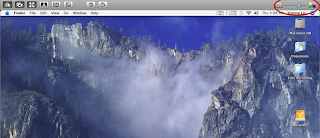
After verifying all network settings and router port forwardings are set up correctly, you might try this if you have an older Mac as the target: move the color slider on the top-right corner of your ARD admin panel to a lower value, and then try to reconnect.

The story is that I was trying to remote control a G4 dual 500 ( Mystic ) from a MacBook Pro (early 2008). This used to work until recently, when I had nothing but a black screen. Keyboard commands still worked (I can blindly log in from the loginwindow), though mouse movements did not pass through to the old Mac.

After fruitlessly chasing network issues with my AirPort router, the last post at an Apple Discussions thread pointed me to the right direction. Once I used the color control on the ARD application to lower the color depth by 1 notch, the next connection worked just fine, with the screen showing up and behaving normally.

Now this poor old G4 tower is running 10.4.11 with an ancient Rage 128 Pro graphics card, but it handles its 17inch screen just fine at “million of colors” color depth when sitting in front of it. Very odd how it just stopped working at that depth over ARD.

DocPreview – browser plug-in to view Microsoft Word documents in Safari

9/26/2016
Needless to say, DocPreview 2 is now deprecated and nonfunctional, given Safari 10’s changes to how extensions work. Back to the drawing board.
5/12/2015
Four years later, Safari on OS X still does not have native .doc preview capability.

But I have made a breakthrough! I have managed to make DocPreview 2, a Safari extension + NPAPI-based plugin that allows in-browser previews of Microsoft .doc and .docx files, for Safari 8.0.6.

I will be writing another blog post of this as soon as I clean it up enough for release, as DocPreview 2. For all the good it’ll do until NPAPI support is removed.

UPDATE:
7/21/2011 – DocPreview DOES NOT work with Safari 5.1 on OS X 10.6+. This is because the WebKit Plugin APIs it depended on are deprecated by Apple. This has broken a number of .webplugin extensions, including some of my favorites like the current (as of today) version of XML View. If you have upgraded to Safari 5.1, on OS X 10.6 or 10.7, then please uninstall DocPreview 0.1 (by removing it from the /Library/Internet Plugins or ~/Library/Internet Plugins directories, depending on where you initially installed it). For those still on Safari 5.0 and below, this will still work.

Only NPAPI plugins are apparently allowed from 5.1 forward. This API does not give native access to the browser window as before; therefore the old methods of converting .doc files to HTML no longer works. Because I still need Word preview capability for myself, I have a few ideas on how to make DocPreview work for 5.1+. However, this requires a complete re-write of the entire code. Apple obviously already has .doc preview capability on iOS but hasn’t shared that with us on OS X. I’m not sure it’ll be worth it to make these modifications, only for Apple to release .doc preview as a native capability to Safari a few months later.

12/1/2010 – As promised, DocPreview is now open sourced at Google Code.

01/24/2010 – DocPreview updated for 64-bit Safari and 10.6. Still seems to work.

early 2009 – Schubert|IT’s Word Browser Plugin has been made a Universal binary. Therefore, DocPreview is no longer needed, as I originally wrote this plugin to fill in the gap when Word Browser Plugin was PPC-only. Word Browser Plugin offers a more advanced user interface than DocPreview. You should try it out first. I will continue to tweak DocPreview, more as a challenge to myself. I will probably open source the package — at soon as I fix a hack or two and no longer feel ashamed of my code.

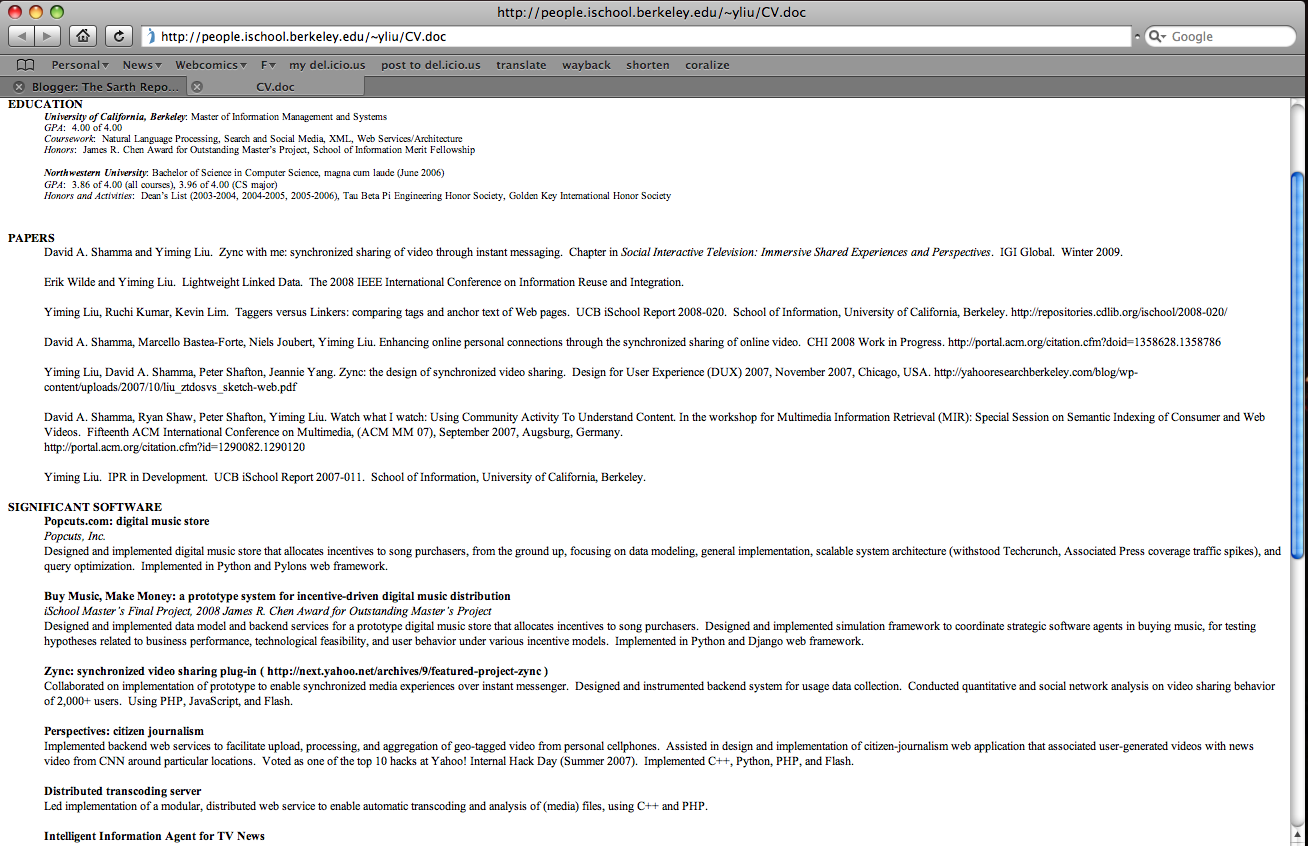
DocPreview is a lightweight WebKit browser plugin I wrote to display a text-only preview of Microsoft Word .doc documents, inline and within Safari 3.x (and, apparently, 4.x) on both Intel and PowerPC Macs. This behavior is much like the functionality provided by the PPC-only Word Browser Plugin from Schubert|IT. DocPreview, of course, is a universal binary plug-in — since Word Browser’s lack of Intel support is/was really why I wrote this plug-in.

DocPreview only supports WebKit-based browsers that can use .webplugin files. Therefore, this includes Safari, Shiira, etc., but not Chrome (as of the time of this update). I am currently unable to support other browsers, since DocPreview is built against the WebKit API instead of the Netscape plug-in API. Frankly, the Netscape API is a mess, and I haven’t had the time to figure it out. A NSAPI guru who could point me in the right direction would be much appreciated.

Download
DocPreview.zip (Safari 5.0 and below on 10.5, 10.6) – v0.1
DocPreview.zip (10.4) – v0.1

This is a work-in-progress. It passes the “dogfooding” test; as in, I’m using this plug-in daily (eating my own dogfood, as they say). While I believe it functions correctly — at least on my machines, I make no guarantees as to stability and usefulness, and am not liable for blowing up your browser or any harm that might befall you through your adventurous use of this plug-in. I do want this thing to work for everyone, so please leave me a note here if it doesn’t work.

DocPreview features & limitations:

  • Universal binary support, for use on both PPC and Intel Macs. No Windows Safari support — and plus, there are already good solutions for inline doc browsing on the Windows side. If you’re on PPC, I suggest you use Word Browser Plugin instead unless you desperately need find-on-page using Safari’s built-in facilities with Word docs.
  • Tested extensively on Safari 4.x, 3.x, and somewhat with Shiira 2.x. May also work on earlier Safari versions, but I simply do not have the ability to test the plugin against them. Does not work on Chrome, but I’m sure there are better solutions using Chrome extensions.
  • Uses OS X’s internal engine for opening and processing Word files. DocPreview performs as well (or as badly, depending on your opinion) as OS X itself for the same task.
  • Supported on OS X 10.5 for .doc, .docx, and .odt files. On OS X 10.5, the plugin can parse Microsoft’s new OpenXML (.docx) and OO.org‘s ODF Text (.odt) documents. On 10.4, the plugin will still work, but only for .doc files.
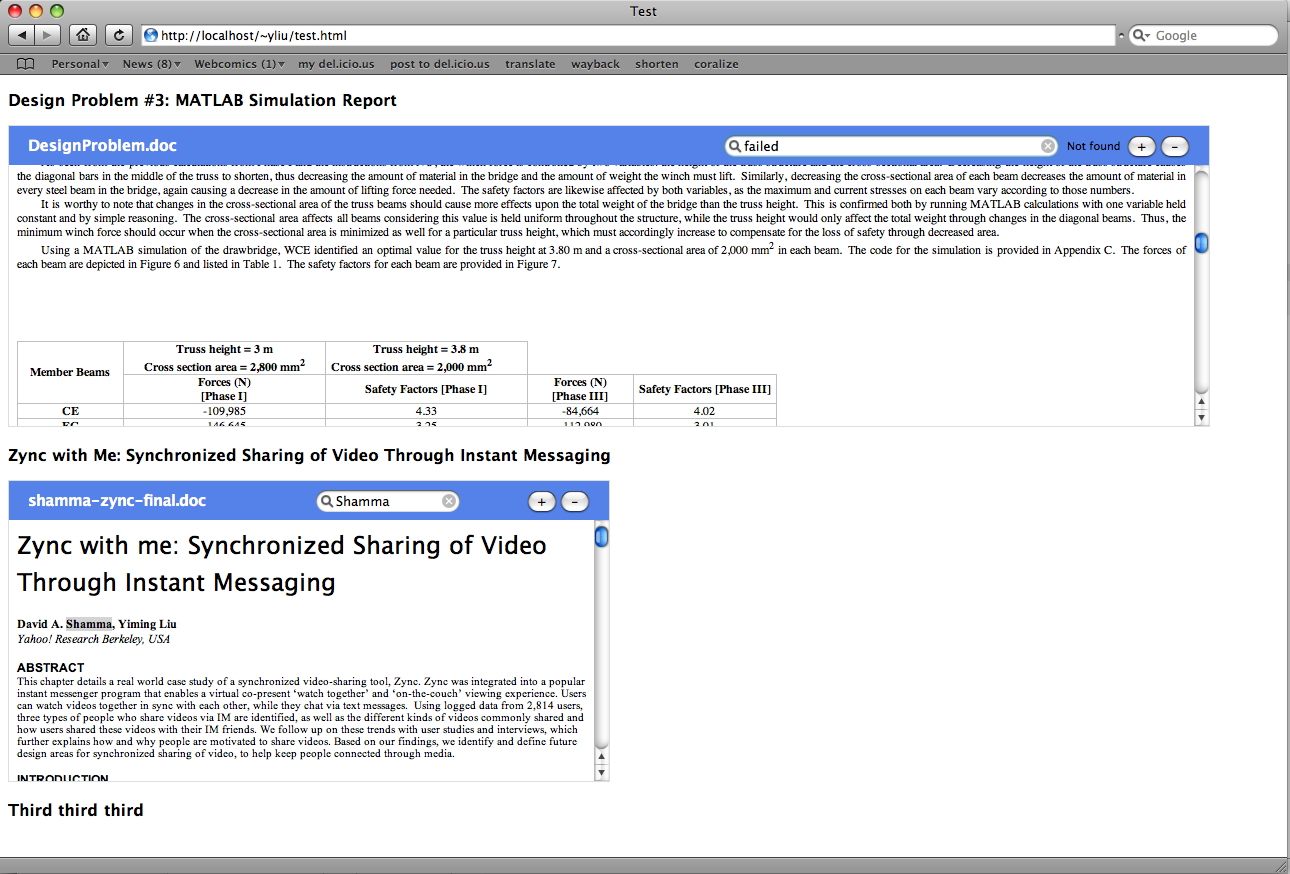
  • Support for full document view mode or embedded mode (if the page author uses object and embed tags, like with Flash objects — although, who actually does that with .doc files? )
  • In full document view mode, DocPreview uses Safari’s built-in Find and Text Zoom abilities. Any command that can be run on a normal Safari webpage can be performed on a DocPreview rendering.
  • In embedded mode, Find on Page and Text Zoom support are implemented separately. I’m still thinking about how I can hook into Safari’s built-in system from within an embedded plugin. Since no one ever uses embedded .doc files anyway, the point is fairly moot for most users.


To install, drag DocPreview.webplugin into
/Users/<your name>/Library/Internet Plug-ins
or
/Library/Internet Plug-ins.

Screenshots of the plug-in in operation can be seen to the right of this post. The first pair of images are .doc files in full document mode in the browser and in Word 2008. The second pair of images are two documents embedded inline using object tags, and one of them shown in Word 2008. As you can see, the conversion fidelity is fairly decent — this is the same level of fidelity that you would have gotten by importing Word data into TextEdit, or using textutil on the command-line.

DocPreview serves the same purpose as Word Browser. It’s intended as a quick preview (much like how Google indexes the text in .doc files), so you don’t blindly download any Word files that actually don’t interest you.

( As an aside, I cannot understand people who want to disable built-in PDF support in Safari :p . That feature has singlehandedly improved my productivity/research output by a magnitude. )

I expect Apple to support .doc previews with the next version(s) of Safari, very soon (ok, so not in 4.x, but surely in 5.x. Anyone on the Apple Safari team reading this: come on, this feature is trivial — even I can do it ). MobileSafari on the iPhone already provides .doc viewing support (and .xls, if I remember correctly). On Windows, MS provides read support for .doc files within the browser. DocPreview is a temporary solution for Safari users until official Apple support (or better yet, better Microsoft Office integration) arrives.

If the thing doesn’t work for you, let me know via the comment thread. If it does work, let me know too. Any suggestions and comments welcome.

Change IP address via (ab)use of DHCP client id

Nowadays customers using cable modems tend to be re-assigned the same IP address once they get one. This is apparently done based on the client MAC address — unless that IP was already taken from the pool when the client connects, the DHCP server will tend to re-issue the old IP. Fairly nice, in that even for “dynamic IP addresses”, the actual IP address assigned rarely changes unless you go offline for an extended period of time.

Problem comes when you actually want to change to a new IP, and can’t wait around for days without a network connection. Usually this is accomplished by changing the MAC address on your machine or router, in a process called spoofing or cloning. Most routers will also have a MAC cloning feature. Swap out the MAC address, and you will be assigned a new IP the next time you connect to the DHCP server.

Except, of course, the Apple AirPort and AirPort Express routers don’t actually have this feature. This is understandable, considering that MAC addresses are supposed to be globally unique so as to avoid network problems — allowing the user to change it willy-nilly will probably not serve that goal. Nevertheless, it is quite annoying in this case, as you won’t be able to change IP with an AirPort router using the MAC cloning method.

There’s one trick that might work for you here, though. A few ISPs’ DHCP servers are set up to accept DHCP Client IDs — an optional field that identifies a DHCP client. While they default to use MAC address as a client identifier by default, they will treat you as a different DHCP client for IP assignment if you start using or change a Client ID. All that is required to obtain a new IP address, then, is to add a Client ID or change it. There is an interface for this in the AirPort Utility, as seen in the screenshot. This is far easier than trying to clone a MAC address on AirPort routers.

Not all ISPs support use of the DHCP Client ID, so this may not work for everyone. Since there are uniqueness requirements involved with these client IDs, it is a good way to screw up DHCP assignments if two clients claim the same ID. If your ISP does support this, make sure to pick a unique client ID.

This trick appears to work for Cox Cable at my current location. It does not appear to work for Comcast.

Bad Google cookie kills Safari

03-10-2010: I believe this is fixed in latest Safari versions. The contents of this post remain for historical purposes only.

In a bizarre case of digital food poisoning, I experienced a series of mysterious, persistent, reproducible crashes with Safari 3.2.1 this morning, traceable to a bad Google cookie.

The symptoms

Google has a nifty query suggestion feature that is turned on by default on its homepage search box. Whenever I typed in a phrase query (e.g. +"query suggestion" +"Google features") with the suggestion feature turned on, the browser crashed with a SIGSEGV around 30% of the time.

Excerpt from the crash log:

Exception Type:  EXC_BAD_ACCESS (SIGSEGV)
Exception Codes: KERN_INVALID_ADDRESS at 0x000000001bdca240
Crashed Thread:  0

Thread 0 Crashed:
0   ???                            0x16619e75 0 + 375496309
1   com.apple.WebCore              0x94325ea0 WebCore::AutoTableLayout::fullRecalc() + 704
2   com.apple.WebCore              0x9432581a WebCore::AutoTableLayout::calcPrefWidths(int&, int&) + 26
3   com.apple.WebCore              0x943252b8 WebCore::RenderTable::calcPrefWidths() + 56
4   com.apple.WebCore              0x9431c04b WebCore::RenderBox::minPrefWidth() const + 27
5   com.apple.WebCore              0x9432507c WebCore::RenderTable::calcWidth() + 124
6   com.apple.WebCore              0x943241a8 WebCore::RenderTable::layout() + 392
...

In the remainder of the cases, when it does not crash immediately, a JavaScript error is logged to the browser error console (to access, go to Develop -> Show Error Console)
SyntaxError: Invalid regular expression: nothing to repeat
http://www.google.com/extern_js/f/CgJlbhICdXMrMAc4AiwrMAo4EywrMA44AywrMBg4Ayw/nMD0sKnpeG0.js (line 21)

for every letter that I type into the search box. During this time, no query suggestion is made.

Diagnostics

  • I have never used an InputManager or “plug-in” to Safari
  • The same crash does NOT happen under a fresh new user account created for diagnostic purposes
  • Clearing the browser cache, temp files, hidden cache files ( getconf DARWIN_USER_CACHE_DIR ), etc. did not help.
  • Deleting Safari preferences did not help.

Solution

After applying a divide-and-conquer strategy to the entire ~/Library directory (not made any easier by Finder’s obstinate resistance to my attempt to move subdirectories within the Library directory, despite having the appropriate permissions — had to drop to Terminal for this), I traced it to the ~/Library/Cookies directory. Moving away the Cookies.plist file contained within cured the crash, the lack of query suggestions, and the Javascript error. More specifically, deleting all Google-related cookies within the Cookies file also accomplished the same thing.

Remarks

Some combination of a bad cookie and bad regexes appears to have triggered a crash bug in this version of WebKit / WebCore. You wouldn’t think a bad cookie could take down a browser. But apparently it does.

I dearly hope this is not a potential buffer overflow or other security problem within WebKit.

Email servers and the MAIL FROM syntax

If you’re into chatting with SMTP servers via telnet ( only for debugging purposes, I swear :p ), be aware that some new email servers strictly interpret RFC 2821 and appears to reject MAIL FROM and RCPT TO addresses of the form [email protected]. Instead, it will return a 555 5.5.2 Syntax error. The proper solution is to enclose the address brackets, as in <[email protected]>.

A redacted transcript:

HELO example.com
250 Hello
MAIL FROM: [email protected]
555 5.5.2 Syntax error.
MAIL FROM: <[email protected]>
250 2.1.0 OK
RCPT TO: [email protected]
555 5.5.2 Syntax error.
RCPT TO: <[email protected]>
250 2.1.5 OK
DATA

....

I’m sure this is intended so that clients that send “Joe Schmoe <[email protected]>” are correctly interpreted. I’m not sure if the RFC asks for this strict enforcement (on my admittedly cursory reading), though and yet a fair number of servers are rejecting the alternate address-only syntax. Wacky.